List filtering
When searching through a list, a filter enables users to specify criteria and only show relevant options. This pattern introduces the filter behavior of Salt components where a list is used.

Use filtering when you have a lengthy list that users have to scroll to view all available options. The pattern typically comprises input and list based components to use a string to filter items for quick selection.
List filtering is a common behavior found in:
ComboBox- List builder
- Pivot table
- Tree builder
- When the user needs to search across broader content or pages, use Search instead.
- When the page is primarily a dashboard or table shell, keep the filter controls in that owning layout instead of using List filtering as the page pattern.
- When the set of options is small and fixed, use Dropdown or another selection control instead.
Build the filtering flow around filter logic, no-match feedback, highlighted matching characters, and loading feedback for slow results.
When filtering results, we recommend:
- Case-insensitive matching, i.e., Alabama, alabama, ALAbama, will all return the same result.
- Matching only the first character(s) of the beginning of any word in the item labels to the filter string.
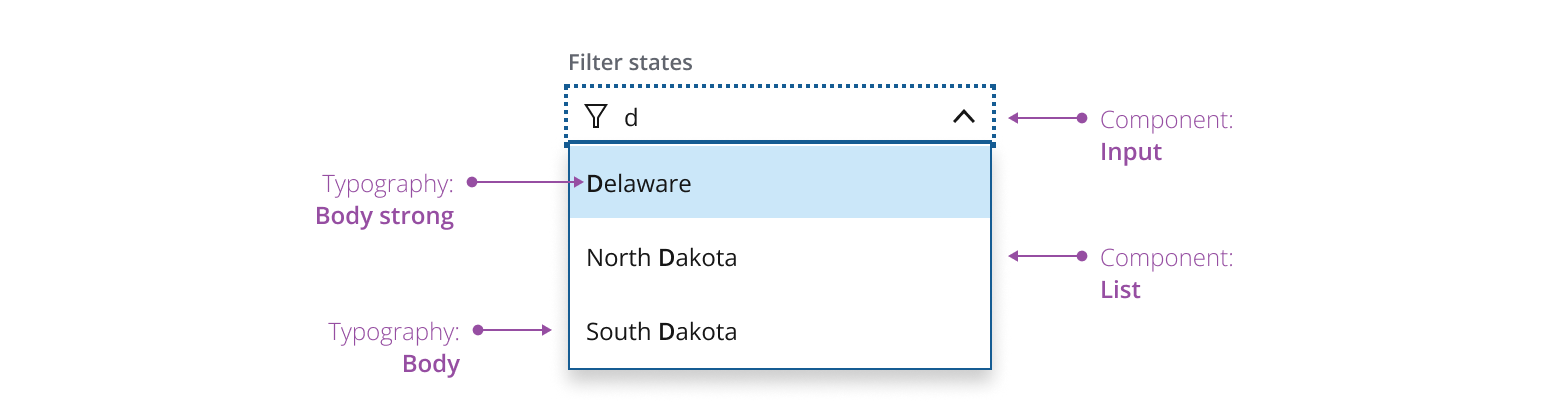
Increase the minimum number of characters required to filter the list if there are a large number of items and results are slow to load. You could, for example, fetch results on input of the first character but only display them on input of the third. This would improve perceived performance.
When there are no items matching the filter text, display an explanatory message instead of the list.

When filtering, highlight matching characters in item labels that match the filter criteria. This tells a user why the filter returned a given item.

Make sure that the text in the list that matches the filter string is displayed in --salt-text-fontweight-strong font weight.
When filter matches take longer to return, display a loading message and a spinner in the field. An example is when the system needs to fetch data from a server.

If you need to expand the pattern or share feedback with us, please contact the team.